
MCP and the dreamcut command
Connect Codex, Claude Code or Cursor to DreamCut over MCP, or use the dreamcut command in Terminal to record, edit and export videos.
DreamCut comes with an MCP server and a dreamcut command, so an AI agent can record your screen, edit the project open in DreamCut and export it. They run the same commands as Sakura in the editor, and every edit is one step you can undo with ⌘Z.
Before you start
- DreamCut is in your Applications folder, and you've opened it once and signed in with a Pro trial or plan. See Install and permissions.
- DreamCut has Screen Recording access, for the
recordandscreenshotcommands. Recording video needs macOS 15 or later. - The project you want an agent to edit is open in DreamCut's editor, and DreamCut isn't exporting it. Edits work while DreamCut records.
- DreamCut doesn't need to be in front. If it isn't running, the first command opens it in the background.
Connect an agent over MCP
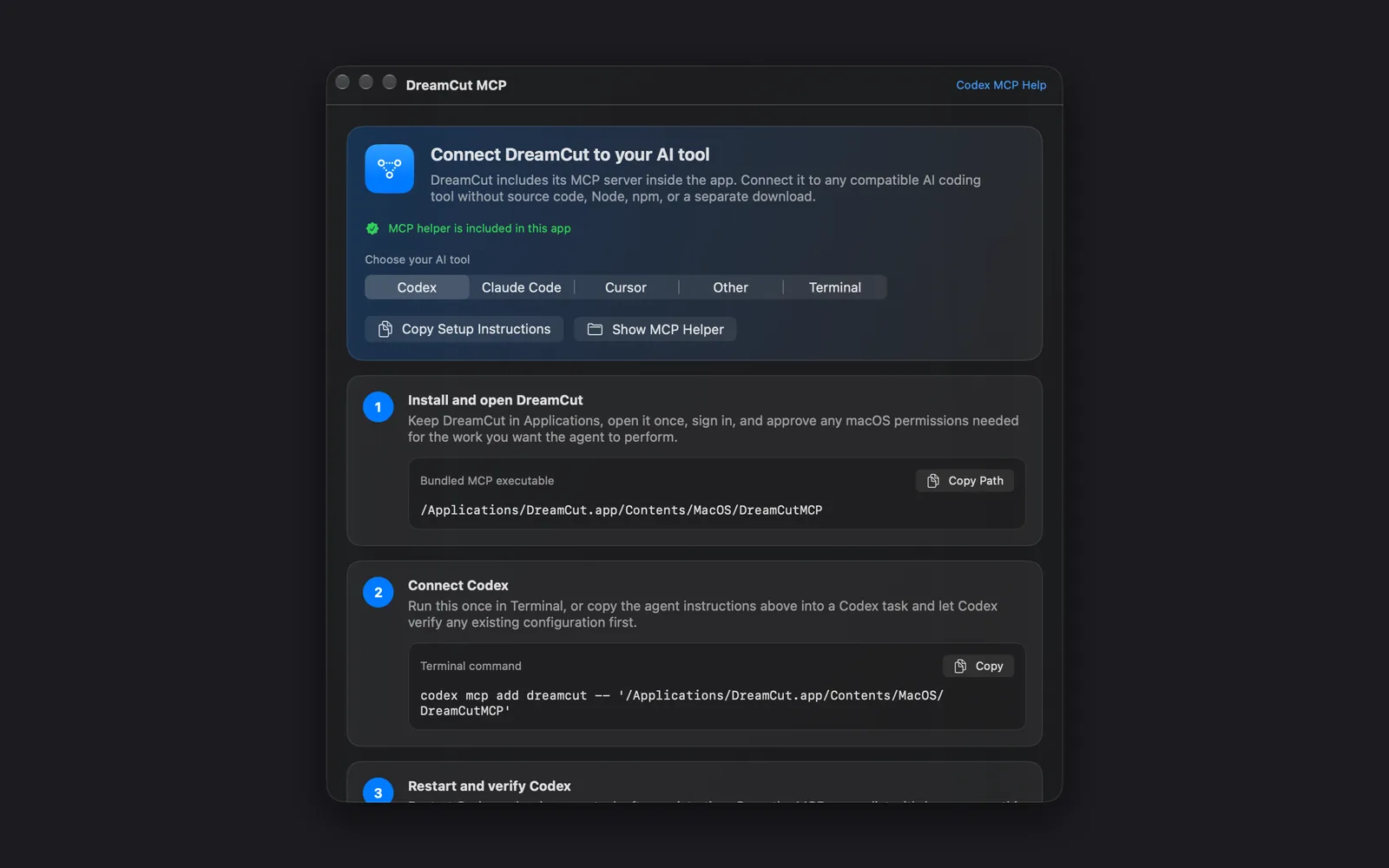
- Click the DreamCut icon in the menu bar and choose DreamCut MCP Instructions. It's also in Capture Options, under the gear on the capture bar. The DreamCut MCP window opens.
- Under Choose your AI tool, pick Codex, Claude Code, Cursor or Other. The server is inside the app, so the window reads "MCP helper is included in this app" and there's nothing else to install.
- In step 2 of the window, press Copy (Copy JSON for Cursor), then set up your tool as its section below shows.
- Restart your tool or start a new session, then check with the command in step 3 of the window, or
/mcpinside the tool.dreamcut_statusshould appear in its tool list.
Codex
Run this once in Terminal, then check it:
codex mcp add dreamcut -- '/Applications/DreamCut.app/Contents/MacOS/DreamCutMCP'
codex mcp get dreamcutClaude Code
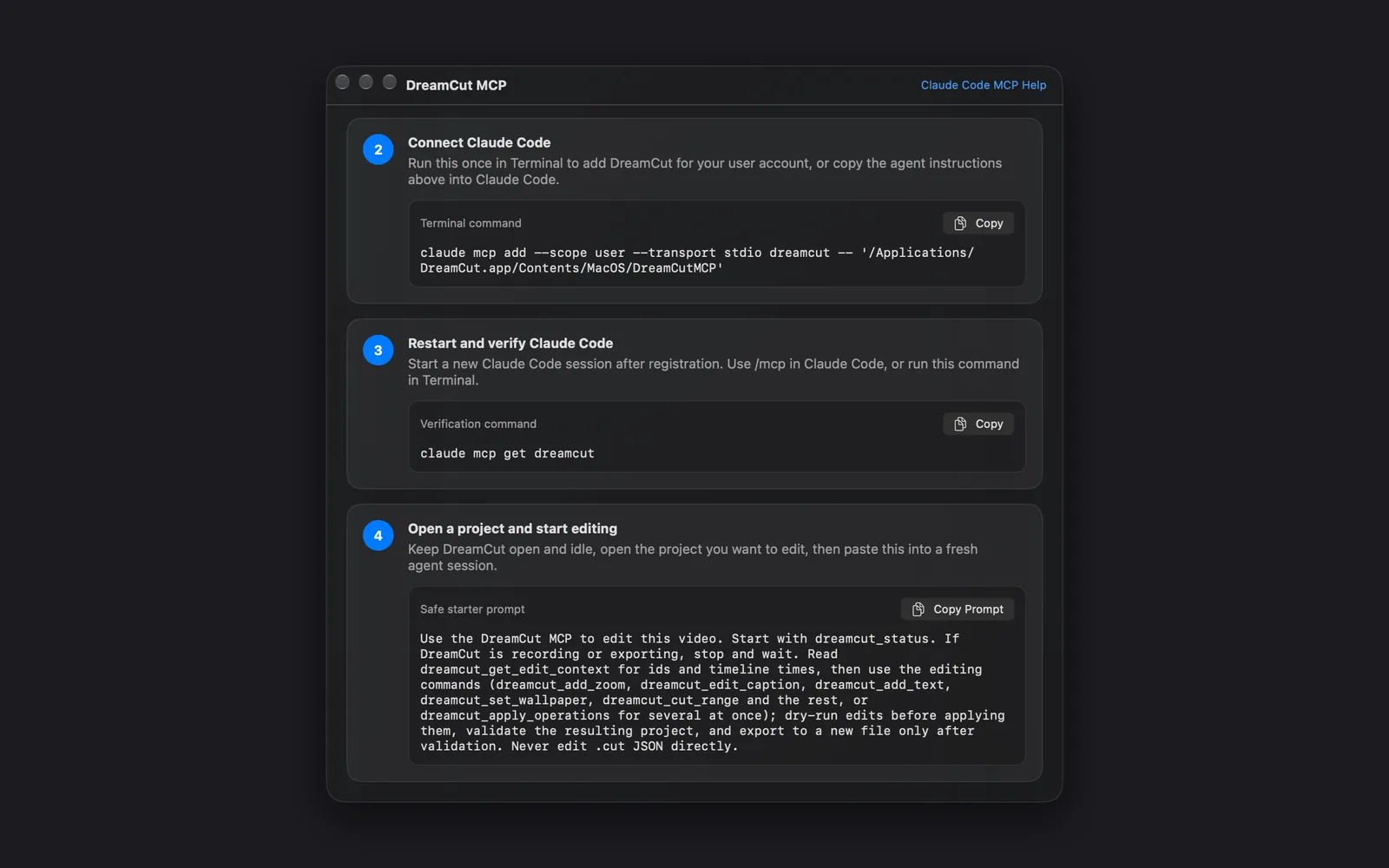
This adds DreamCut for your user account, so every project sees it. Start a new Claude Code session afterwards.
claude mcp add --scope user --transport stdio dreamcut -- '/Applications/DreamCut.app/Contents/MacOS/DreamCutMCP'
claude mcp get dreamcutCursor
Press Copy JSON and merge it into ~/.cursor/mcp.json, Cursor's global MCP settings, keeping the servers already there. Then restart Cursor or reload its window, and check that dreamcut is on under Customize > MCP.
{
  "mcpServers": {
    "dreamcut": {
      "type": "stdio",
      "command": "/Applications/DreamCut.app/Contents/MacOS/DreamCutMCP",
      "args": []
    }
  }
}Other MCP tools
Add a local server in your tool's MCP settings with these values. Copy Path copies the command, and Show MCP Helper shows the file in Finder.
| Field | Value |
|---|---|
| Name | dreamcut |
| Transport | stdio |
| Command | /Applications/DreamCut.app/Contents/MacOS/DreamCutMCP |
| Arguments | None |
Ask for your first edit
- Open the project in DreamCut's editor.
- In step 4 of the DreamCut MCP window, press Copy Prompt under Safe starter prompt and paste it into a fresh agent session. It tells the agent to check that DreamCut isn't busy, read the project first, try each edit before applying it and export to a new file.
- Ask for what you want in plain words, for example:
Add captions, then remove the ums and uhs and every pause longer than 2 seconds.
Tell me your plan before you apply it, then export to ~/Movies/demo-edited.mp4.The edits appear in the editor as the agent applies them. If one isn't right, press ⌘Z in DreamCut or ask the agent to undo it. Filler words are found in the captions, so a project needs captions before they can be cut, which is why the example asks for captions first. Making the captions spends AI credits; the cuts and the export don't.
Use the dreamcut command
The dreamcut command runs the same commands from Terminal, or from an agent that runs shell commands instead of MCP.
- In the DreamCut MCP window, pick Terminal.
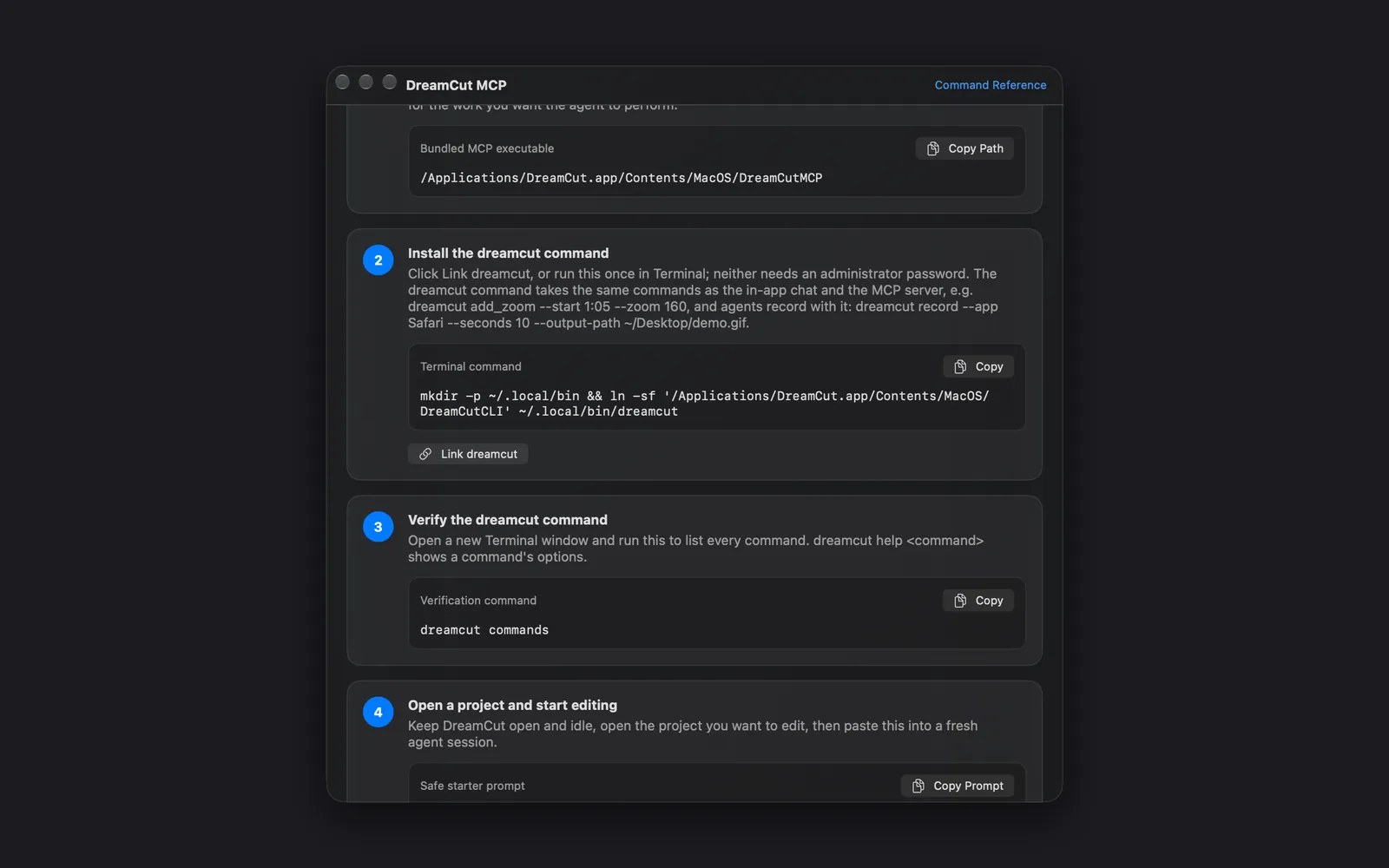
- Under Install the dreamcut command, click Link dreamcut. Or press Copy and run the command in Terminal yourself. Neither needs an administrator password: both link the command into a folder in your home folder.
mkdir -p ~/.local/bin && ln -sf '/Applications/DreamCut.app/Contents/MacOS/DreamCutCLI' ~/.local/bin/dreamcut- Read the message next to the button, such as "Linked at ~/.local/bin/dreamcut." If it says your shell doesn't look there yet, press Copy on the line it shows and run it in Terminal. That line is:
echo 'export PATH="$HOME/.local/bin:$PATH"' >> ~/.zshrc- Open a new Terminal window, as step 3 of the window says, and check that it works.
dreamcut commandslists every command, anddreamcut statusshows whether DreamCut is busy:
dreamcut commands
dreamcut statusOptions go after the command:
- Write each one as
--name value. Times can be seconds or minutes and seconds (1:05). - To pass them all at once, use
--jsonwith a JSON object:dreamcut add_zoom --json '{"start": 65, "duration": 3, "zoom": 160}'. dreamcut commands --jsonlists every command and its options as JSON.- With Terminal picked, Command Reference at the top right of the window opens the full list on the DreamCut MCP page.
| Command | What it does |
|---|---|
dreamcut status | Whether DreamCut is recording or exporting, the open project, and the AI credits you have left |
dreamcut context | The open project's scenes, captions and layers, with their ids and times |
dreamcut help add_zoom | A command's options |
dreamcut add_zoom --start 1:05 --duration 3 --zoom 160 | Zooms to 160% at 1:05 for 3 seconds |
dreamcut cut_range --start 10:20 --end 10:25 --dry-run | Shows what a cut would do without making it |
dreamcut undo | Undoes the last edit, like ⌘Z |
Export from Terminal
dreamcut export_project exports the open project to a new file, then checks the file's size, length and frames before it reports success. It never overwrites a file that's already there.
dreamcut export_project --output-file-path ~/Movies/demo.mp4| Option | What it does |
|---|---|
--output-file-path | Where the video goes, ending in .mp4 or .mov. Required |
--resolution-raw-value | 720p, 1080p or 4K. 1080p if you leave it out |
--fps | 24, 30 or 60. 30 if you leave it out |
--quality-raw-value | Web, High or Max. High if you leave it out |
--include-captions false | Leaves the captions out of the video |
dreamcut export_video exports with your current export settings to your export folder instead.
Record the screen or take a screenshot
dreamcut record records for as long as you say, then prints the file's path. dreamcut screenshot takes a still, and captures a window even when other windows cover it.
dreamcut record --app Safari --seconds 20 --output-path ~/Movies/demo.mp4
dreamcut record --app Safari --seconds 10 --output-path ~/Desktop/demo.gif
dreamcut screenshot --app "Google Chrome" --output-path ~/Desktop/shot.png| Option | What it does |
|---|---|
--app | Captures that app's front-most window. Without it, the main display |
--window-title | Only a window whose title contains this text |
--seconds | How long record records, up to 3,600 seconds |
--output-path | Where the file goes. A path ending in .gif makes a looping GIF (--gif-width, --gif-frame-rate). Without it, the file stays in DreamCut's Captures folder |
--include-microphone, --include-system-audio, --include-camera | Turn on sound or the camera, which are off by default |
They're quiet by default: no countdown, preview card, sound or capture bar, and your saved capture settings stay as they are. For a recording that ends when the work is done, run dreamcut start_screen_recording, then dreamcut stop_screen_recording --output-path …. Agents on MCP have the same tools, such as dreamcut_record and dreamcut_screenshot.
A recording started with start_screen_recording stops by itself after 30 minutes unless you set --maximum-duration-seconds (up to 3,600), and dreamcut status shows it while it runs.
If it doesn't connect
| What you see | What to do |
|---|---|
zsh: command not found: dreamcut | Your shell doesn't look in ~/.local/bin yet. Run the PATH line from step 3, then open a new Terminal window |
dreamcut_status isn't in your agent's tool list | Start a new session or restart the tool. Check that its command is the path under Bundled MCP executable in the window; Copy Path copies it |
| "DreamCut is busy: exporting." | The open project is exporting, so the command was refused. Wait for the export to finish, then run it again |
| "DreamCut is busy: recording." | A recording is already running, so a new one was refused. Wait for it to end, then start yours |
| "DreamCut didn't start within 45 seconds." or "DreamCut is running but hasn't opened its automation bridge." | Open DreamCut yourself, or quit and reopen it, sign in if it asks, then run the command again |
| DreamCut isn't in your Applications folder | The window's commands point at the copy of DreamCut you opened. Move DreamCut to Applications, open it from there, and copy the commands again |
What spends credits
Commands that use AI take credits from your DreamCut account, the same as those features in the editor. dreamcut status shows what you have left.
| Commands | What the credits pay for |
|---|---|
generate_captions | Captions transcribed from the narration |
clean_audio | Background noise removed from the narration |
add_ai_voiceover, revoice_audio | An AI voice reading a script, or your narration again in another voice |
add_ai_avatar | A talking avatar: about 4 credits a second, or 12 for a digital twin on Avatar V |
add_ai_music, add_ai_sound_effect | Generated music or a sound effect |
add_ai_image, add_ai_video | A generated picture or video clip. Video costs the most |
make_shorts | Shorts found in a long video: about 1–2 credits a minute of video |
generate_elevenlabs_voice, generate_music, generate_sound_effect, process_audio | The same AI voice, music, sound effects, noise removal and captions, through tools that aren't in Sakura's chat |
record or start_screen_recording with --include-microphone | Cleaning the microphone when the recording stops, about half a credit a minute, if Clean audio automatically is on in your settings. Add --clean-audio false to record or stop_screen_recording to skip it |
Other edits, such as zooms, cuts, removing pauses and filler words, text, layouts and transitions, spend no credits, and neither do screenshots and exports. Plans and credits explains your monthly allowance.
What's next
- Sakura: the same edits from a chat in the editor.
- Export settings: choose the format and quality
export_videouses. - Plans and credits: your credits and how to top them up.
- Install and permissions: sign in and allow Screen Recording.