
Plans and credits
Compare DreamCut's Pro and Max plans, start the 3-day trial, buy extra AI credits at cost, and check what you've used in the AI Usage window.
DreamCut needs a Pro trial or a paid plan to record and edit. Each plan comes with AI credits every month for captions, Sakura, AI voices, generated pictures and the other AI features, and one credit is one cent of what DreamCut pays the AI provider. You start the trial, move up a plan and buy more credits in one window.
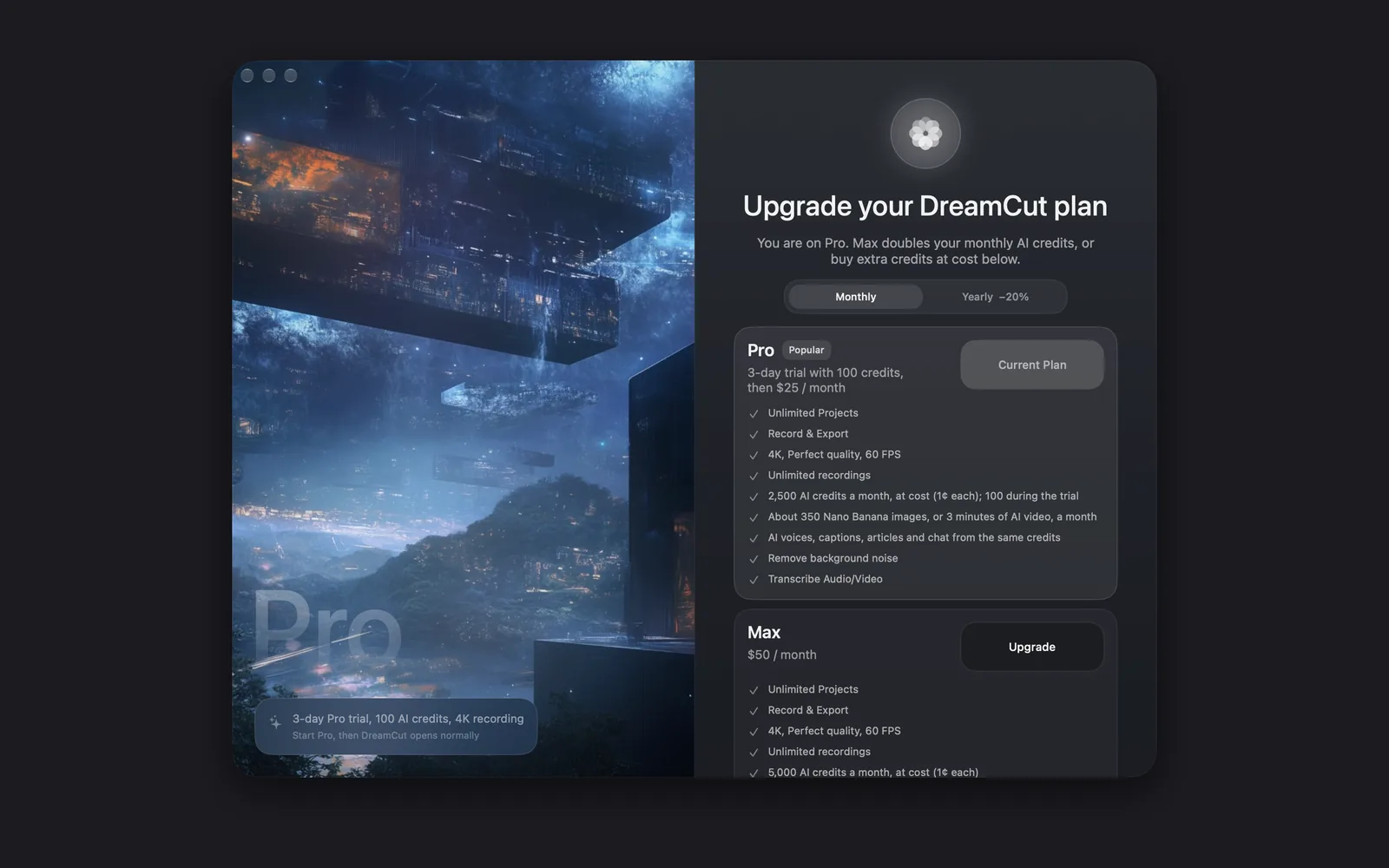
Open the plans window
The window opens on its own when you sign in without a trial or plan. Any other time:
- Click the DreamCut icon in the menu bar.
- Choose Upgrade or buy credits. On Max it reads Buy credits.
Its title says where you stand: Start your DreamCut Pro trial on a Free account, Unlock full DreamCut Pro during the trial, Upgrade your DreamCut plan on Pro, and DreamCut Max is active on Max.
The price line on the Pro card changes with your account and the billing switch:
| When | The Pro card reads |
|---|---|
| You're on the trial | "Upgrade now to paid Pro and unlock 2,500 credits a month." |
| Any other time, with Monthly picked | "3-day trial with 100 credits, then $25 / month" |
| Any other time, with Yearly −20% picked | "3-day trial, then $240 / year ($20 a month)" |
On paid Pro and Max the card keeps the trial wording, as in the picture at the top: it gives Pro's price, not a trial you can start again. The Max card reads "$50 / month", or "$480 / year ($40 a month)" with Yearly −20% picked.
The plans
| Free | Pro | Max | |
|---|---|---|---|
| Price | $0 | $25 / month, or $240 / year ($20 a month) | $50 / month, or $480 / year ($40 a month) |
| AI credits | None | 2,500 a month; 100 during the trial | 5,000 a month |
| What the credits buy | None | About 350 Nano Banana images, or 3 minutes of AI video, a month | About 700 images, or 6 minutes of AI video, a month |
| Trial | None | 3 days | None: Max starts as a paid plan |
| Recording and editing | No: start the Pro trial first | Unlimited projects and recordings, 4K, Perfect quality, 60 FPS | The same as Pro |
Pick Yearly −20% in the plans window to pay for a year at once. The credits still come monthly, resetting each month on your subscription date. Both paid plans have the same features, from background noise removal and transcription to AI voices, captions, articles and chat, all paid for from the same credits. Max only doubles the credits.
Start the Pro trial
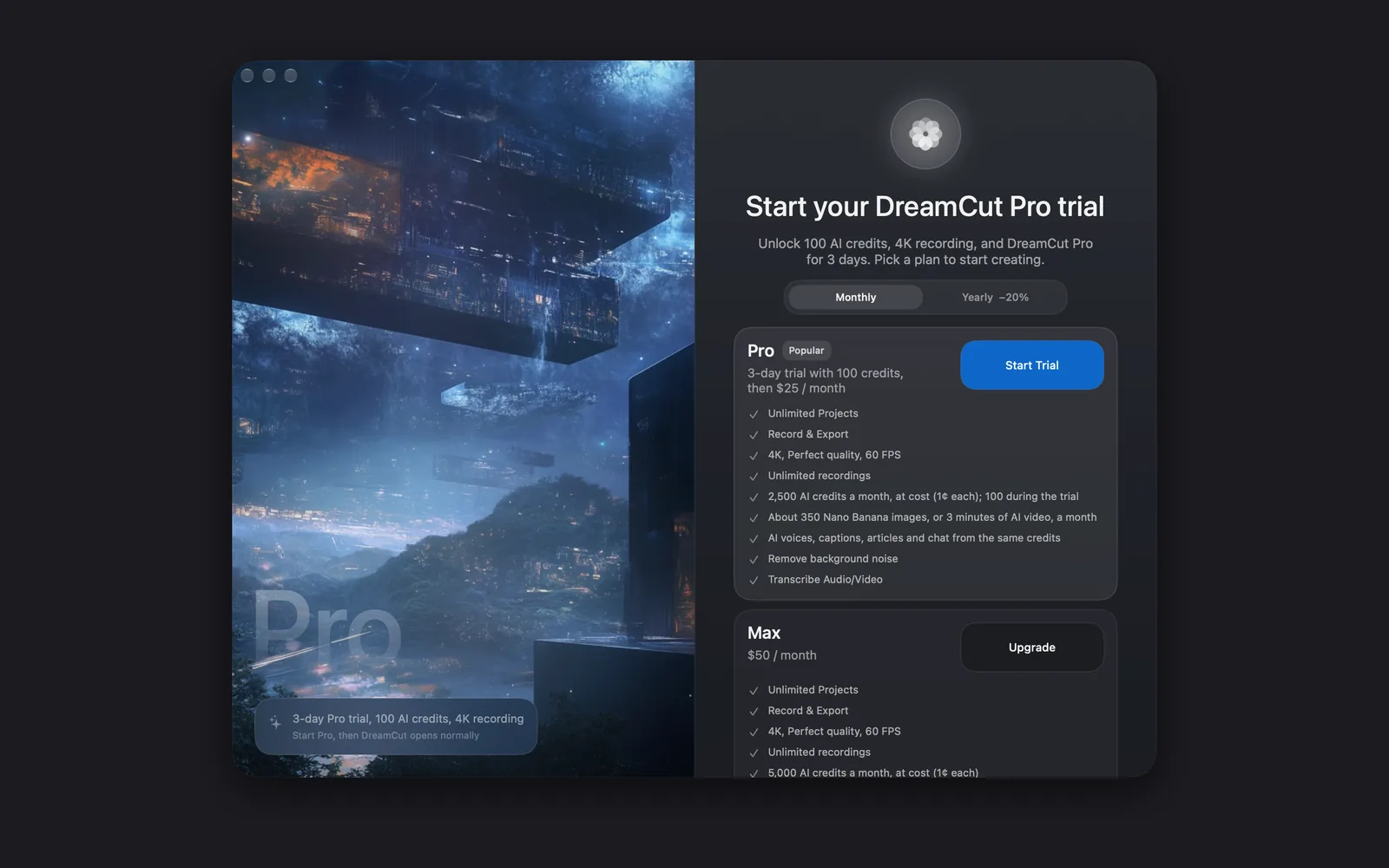
- In the plans window, pick Monthly or Yearly −20%.
- On the Pro card, click Start Trial. Stripe checkout opens in your browser.
- Finish checkout, then come back to DreamCut.
- Click Refresh Plan. Once DreamCut sees your trial, the window closes and the capture bar appears.
The trial lasts 3 days and comes with 100 AI credits. Checkout asks for a payment method, and you aren't charged until the trial ends. After 3 days it turns into paid Pro, and your credits go up to 2,500 a month.
To get paid Pro and its 2,500 credits before the 3 days are up, open the plans window during the trial and click Upgrade Now on the Pro card. If the payment goes through, DreamCut says "Paid Pro is active." If Stripe needs you to confirm it, Stripe opens in your browser: finish there, then click Refresh Plan.
Install and permissions covers the trial as part of setting up DreamCut.
Move up to Max
- Click the DreamCut icon in the menu bar and choose Upgrade or buy credits.
- On the Max card, click Upgrade. Stripe opens in your browser.
- Confirm it, come back to DreamCut and click Refresh Plan.
Max has no trial, so it's paid from the start. Stripe charges the difference straight away and moves your billing date to that day; moving up during the Pro trial ends the trial. Move up part-way through a month and your limit rises to 5,000 credits as soon as DreamCut sees Max. The plans window only moves you up: to switch from Max to Pro, change how you pay, or cancel, use Manage subscription.
The buttons in the plans window
| Button | Where it shows | What it does |
|---|---|---|
| Start Trial | The Pro card, on a Free account | Opens Stripe checkout for the 3-day trial |
| Upgrade Now | The Pro card, during the trial | Ends the trial and starts paid Pro with 2,500 credits a month, or opens Stripe to confirm the payment first |
| Upgrade | The Max card. On Max, a greyed-out Upgrade sits on the Pro card instead | Opens Stripe to start Max or move up to it |
| Current Plan | The card of the plan you're on | Nothing: it marks your plan |
| The credit packs | Under Buy credits, on the trial or a plan | Opens Stripe to buy that pack. See Buy more credits |
| Refresh Plan | Below the credit packs, or below the cards on a Free account | Checks your plan again after you've finished in Stripe |
| Use a different account | At the bottom | Signs you out and goes back to sign-in |
| Not now | At the bottom | Closes the window |
Buy more credits
On Pro, the Pro trial or Max, you can top up your credits at any time.
- Click the DreamCut icon in the menu bar and choose Upgrade or buy credits, or Buy credits on Max.
- Scroll down past the plan cards to Buy credits, and click a pack.
- Pay in Stripe, which opens in your browser. The credits arrive as soon as the payment goes through.
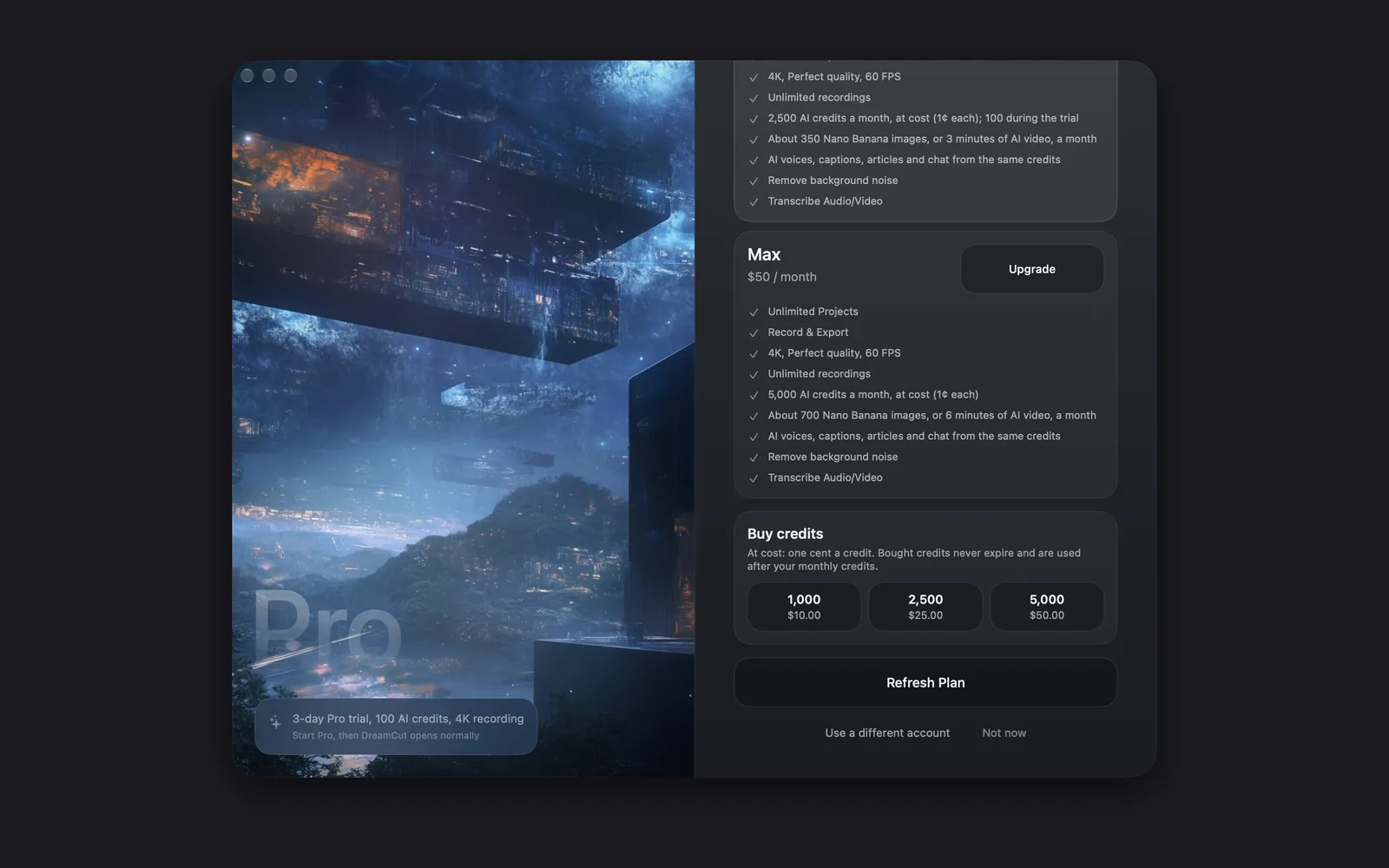
| Pack | Price |
|---|---|
| 1,000 credits | $10.00 |
| 2,500 credits | $25.00 |
| 5,000 credits | $50.00 |
Bought credits are sold at cost, one cent each. They never expire, and DreamCut uses them only after your monthly credits run out. While you have some left, the window says how many, such as "You have 1,000 credits bought and unused."
What credits pay for
Credits pay only for AI work. These use them:
- Captions and transcripts, made from what you said
- Dictation when you hold fn
- Clean audio, which removes background noise
- Sakura, the editor's AI, and Article Studio
- AI voices, including speech in a cloned voice, music and sound effects
- Pictures and video from Generate media, cut-outs, B-roll, AI avatars and templates
These never use credits:
- Recording your screen, camera and microphone, screenshots and quick captures
- Editing by hand: cuts, zooms, titles, overlays, transitions and layouts
- Removing the background behind you on the camera, which runs on your Mac (Layout and camera)
- Exporting your video
See what you've used
Click the DreamCut icon in the menu bar. While you're signed in, the bottom of the menu shows your account:
| Row | What it shows |
|---|---|
| Email: | The account you're signed in with |
| Plan: | Your plan, such as Free, Pro Trial, Pro, Max or Pro (DesignCode) |
| AI: | Credits used this month out of your plan's, such as "1,240 / 2,500 credits", with "+ 1,000 bought" when you have bought credits left. Click it to open AI Usage |
| Reset: | How your monthly credits reset: on your subscription date, your account anniversary or the first day of the month, or "During your Pro trial" |
| Next reset: | The date they next reset |
The AI Usage window shows the same total in large type, a sentence on when your credits reset, and tags for your plan, the reset and the next reset date. Under Usage Log is each recent charge, named for what used it, such as Transcription, Audio cleanup or Image generation. Each row shows the credits it added, the running total before and after, the provider and model, and when it happened. "Monthly reset" rows mark each new month. Click Refresh at the top right to load the latest.
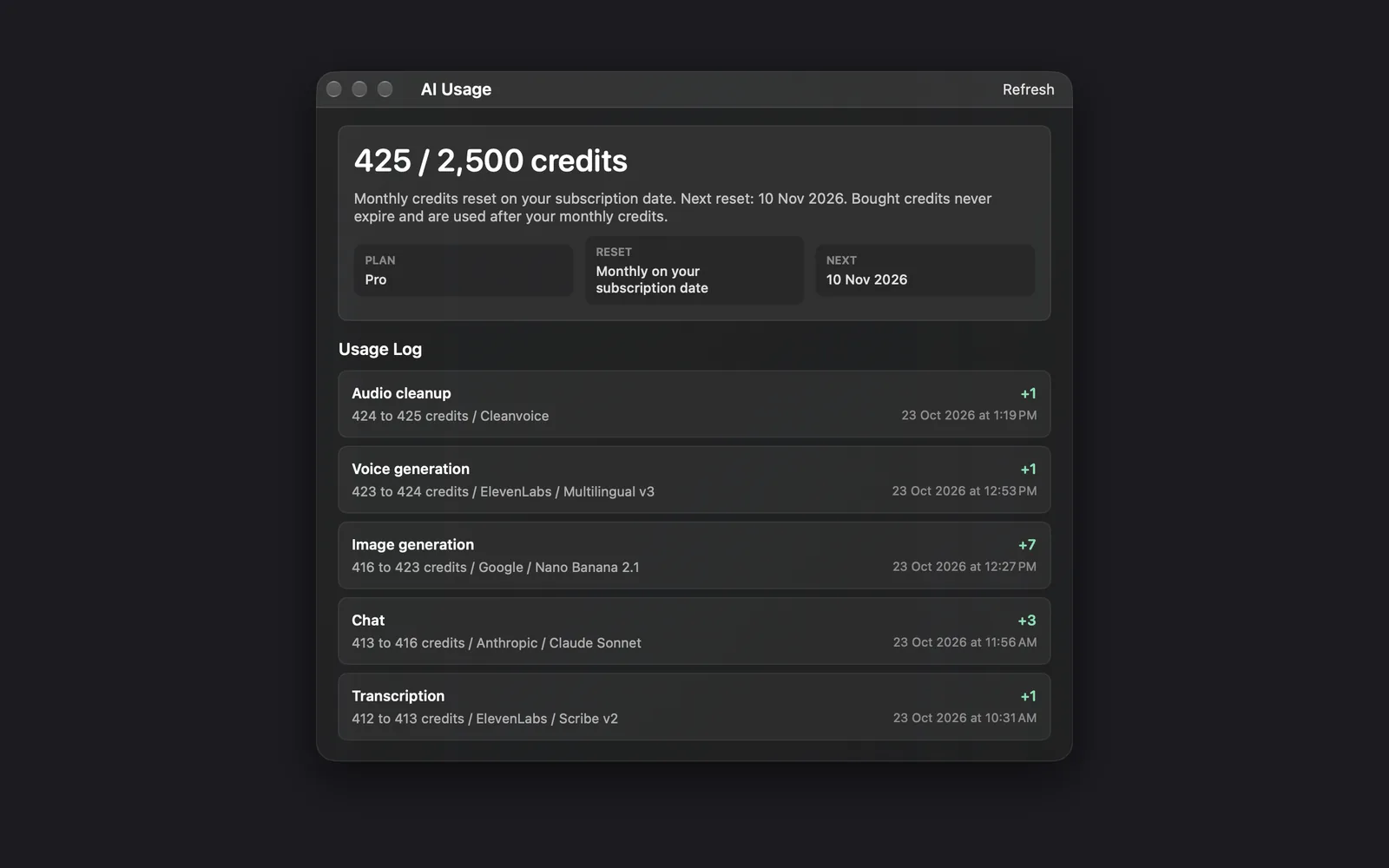
Monthly credits don't carry over: at each reset your used count starts again from 0. Bought credits stay until you use them.
When credits run out
AI features stop and say so, for example "Out of DreamCut AI credits for this month (2,500 / 2,500 credits)". Some add what the task would use. Buy a pack, move up to Max, or wait for the reset. Recording, editing and exporting carry on as normal.
Manage or cancel your subscription
To manage your plan, billing and payment details, or to cancel:
- Click the DreamCut icon in the menu bar and choose Manage subscription. The same button is in Settings, under General: Manage Subscription.
- Stripe's customer portal opens in your browser. Make your changes there.
- Back in DreamCut, open the plans window and click Refresh Plan to pick up the change.
When you cancel a paid plan, DreamCut keeps working for as long as Stripe still counts the subscription as active. Once it ends, DreamCut locks and asks you to start a plan again. The plans window says bought credits never expire, but you can't spend them while DreamCut is locked.
If a payment doesn't go through, Plan: reads "Pro Billing Issue" or "Max Billing Issue", and DreamCut asks for a plan again until you update your payment details in the portal.
DesignCode Product Pass
A DesignCode Product Pass gives you DreamCut Pro for free until a set date. It needs no card and doesn't renew by itself.
- Open the activation link from DesignCode. DreamCut opens.
- Sign in, or create your DreamCut account. The window DesignCode Product Pass says "DreamCut is verifying the complimentary Pro access linked to your signed-in account."
- When it's done, DreamCut says "DreamCut Pro Activated" and gives the date your access runs to. If it says "Product Pass Activation Failed" and the problem can be retried, click Retry Activation; otherwise the message says what went wrong.
While the pass is active, Plan: reads "Pro (DesignCode)", you get Pro's 2,500 credits a month, and Settings, under General, shows DesignCode Product Pass with the date it ends. Manage subscription is hidden, since there's nothing to bill, unless you also pay for a plan through Stripe. When the pass ends, start a plan to keep using DreamCut.
Tips
- Update DreamCut to keep using AI at the top of the account rows means AI features are paused until you update the app.
- Use a different account in the plans window, or Log out in the menu bar menu, switches accounts. Plans and credits belong to the account, not the Mac.
- The pricing page on dreamcut.ai lists the same prices and credits, if you'd rather compare plans in your browser.
What's next
- Settings: your subscription, recording defaults, sounds and shortcuts.
- Generate media: make pictures and video with your credits.
- Sakura: ask for edits in plain words.